About Vampire’s Charm Demo: Expanding Symbols
This is a third-party free-play demo, not real-money play on Demo slot pg. Availability and access checks are controlled by the provider. Demo results do not predict future outcomes.
The free Vampire’s Charm Demo is built around a small reel grid and a display above it. When the game names a special expanding symbol, look in that upper display before watching the grid. The selected picture can fill an entire reel and then shift toward the left. That is not the same as adding another reel or beginning a second spin. The embedded game uses virtual credits only and does not offer a deposit, withdrawal or cash prize.
A gothic portrait framed above the action
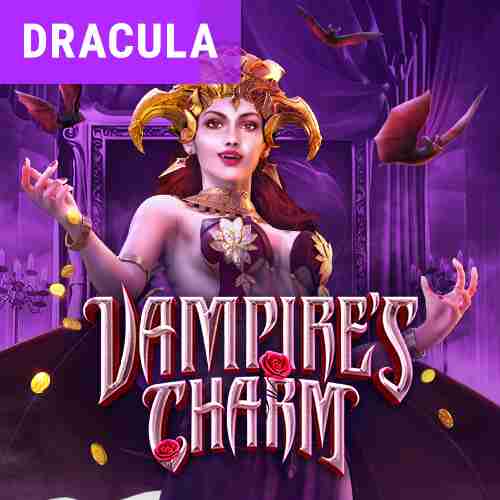
PG SOFT’s cover presents a woman with an elaborate headdress against a purple fantasy backdrop. The playable interface retains that theatrical feel but gives the grid room of its own. On a first look, distinguish the character art at the top from a portrait inside a reel position. A separate panel can show the current special picture. The similar framing across those areas is attractive, but it also explains why it helps to read each space by its role before trying to follow the movement.
The studio’s examples use recognizable small shapes around the portraits, including a goblet, royal card ranks and red lips. The red lips on a decorated badge denote the Scatter in the illustrated symbol guide. Prefer the word on the badge to the color of the frame, since several regular pictures use red and gold. Locating that badge first makes it easier to read the later feature screen without confusing the Scatter with the selected expanding picture.
A compact grid with defined lines
The technical guide specifies five reels, three rows and ten lines. The fixed board size is a useful distinction in a game with the word expanding in its feature name. You can watch the contents of a column change without the cabinet growing any wider or taller. The important comparison is the number of cells one picture occupies, not the number of reels. A single large illustration can replace the separate pictures that were previously visible in that column.
The lines are easier to understand from the provider’s marked examples than from the decorative edge of the board. In the screenshots, thin lines cross the grid after expanded symbols shift toward the left. The highlighted routes are separate from the borders around the symbols themselves. The first tells you which result paths the game is showing; the second tells you which pictures to follow. Read them in that order if you want to see why a settled layout is different from the opening display.
How the special picture is chosen
The developer describes an Expanding Symbols feature that can occur in the main game. When it occurs, the game chooses a picture other than the Scatter. A goblet is used in the published example, but it is not permanently assigned to the role. Read the upper panel to see which symbol has been named for the current process. After that, look for the same outline on the reels rather than treating every gold-trimmed card as part of the feature.
An exercise using the manual stills helps explain why the upper display matters. First compare the shape of the chosen goblet above the grid with its ordinary version on the reels. Then follow the one that fills a column. The art hasn’t become a different object, but it occupies more of the board. Finally compare the position of the column before and after the leftward shift. This sequence is useful as a visual explanation, not a guide to when the demonstration will choose a certain symbol.
Expansion and the leftward shift are separate movements
The rules describe special symbols expanding and being shifted to the left before the game settles the result. Think of expansion as a change in height: a picture that originally occupied one position can fill its reel. Think of the shift as a change in the horizontal arrangement. A tall shape can therefore first be visible near the right and then be shown with other expanded shapes toward the left. It is one board moving through two steps, not another set of reels being added.
To keep those steps clear on a small screen, choose one middle divider as a reference and look at the position of the expanded reel relative to it. Then check what the result lines show after the movement finishes. You may be able to see the expanded shape before the lines appear, but the appearance alone does not establish a particular result. The provider’s annotated images can show this in slower, easier-to-read frames.
The red-lips Scatter opens a different mode
PG SOFT’s information shows three, four or five Scatters starting ten, fifteen or twenty free spins respectively. Those counts describe the documented entry state. The game then selects a special expanding symbol for the feature, excluding the Scatter. In the published stills a card rank with a rose is used as the example, which shows why a picture that looks ordinary in the main grid can be important once it has been selected.
When reading the feature, keep the starting count separate from the name of the expanding symbol. The count describes a group of free spins, while the symbol display names the picture the expansion rule can affect. Neither is a cash amount. The game chooses the feature symbol, and the preview offers no basis for predicting which image the selection will show in a later session.
Make a short visit useful
Open Play for free, wait for the title artwork to change, and find the rules panel. Start by identifying the red-lips Scatter, then locate the space above the reels for the chosen picture. If you see a feature in motion, look first at the upper display, second at the height of one matching picture on the board, and last at where it ends up. This gives you a useful view without trying to follow every bright line.
If nothing expands, the official examples are enough to compare the states. There is no need to let the demo run while you wait for a particular picture. The virtual balance cannot be cashed out, and the feature serves as an illustration of the game rather than evidence about any future result.
Sources and availability
The mechanics, pictures and line layout are based on PG SOFT’s official Vampire’s Charm game information. The existing listing cited this reference for demo availability. The provider hosts the free player and controls access, language and the current rules. This preview is for adults and uses virtual credits only. See the website policies for more information.